Tampilkan postingan dengan label rockchip. Tampilkan semua postingan

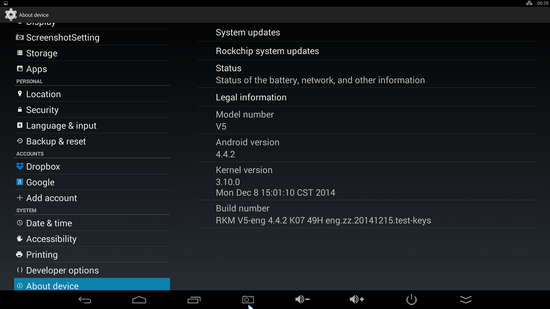
Photo Gallery: Latest Android KitKat stock firmware installed on Rikomagic V5 TV Stick


Photo Gallery: Latest Android KitKat V5 FW_141215 stock firmware installed on Rikomagic V5 TV Stick. 


About Rikomagic 
We were pioneers of the Android Mini PC concept and were the first Android Mini PC provider. Based in Shenzhen, China, Rikomagic aims to revolutionize the digital media player market. Our Research and Development team has extensive expertise in consumer electronics products and the development of network media players. Our core strength remains focussed around Android PCs and Android Mini PCs, where we have a great deal of experience. Rikomagic has been at the forefront of the development of multimedia, internet connected devices which truly transform TVs into home entertainment centers. The combination of our forward-looking market research, proven technological expertise and acumen, innovation, and our mature and efficient development process has given us industry-wide recognition. We differentiate ourselves by the quality, value and sophistication of our products. Our customers trust the RKM brand to enhance their entertainment experience, and we always strive to exceed their expectations.

Download latest Android KitKat 4.4.2 stock firmware for TRV3 TV Box


Download latest Android KitKat 4.4.2 stock firmware for TRV3 TV Box from here or from here

 
Firmware: TRV3_RK3188_Android4.4.2_20140530
Model: TRV3 TV Box
Archive size: 282 MB
Platform: Rockchip RK3188

Download latest Android KitKat 4.4.2 stock firmware for T031 TV Box


Download latest Android KitKat 4.4.2 stock firmware for T031 TV Box from here or from here

 
Firmware: T031_chuangsiqi_fakeddr_AP6330_20150113
Model: T031 TV Box
Archive size: 466 MB
Image file name: T031_chuangsiqi_fakeddr_AP6330_20150113.img
Platform: Rockchip RK3288
Boot version: 2.17
FW Version: 4.4.02

Download latest Android KitKat 4.4.2 111k4 stock firmware for Tronsmart R28 TV Box


Download latest Android KitKat 4.4.2 111k4 stock firmware for Tronsmart R28 TV Box from here or from here. Download another firmware version from here or here. Download previous  version from here.

 
Firmware: Tronsmart Orion R28_111k4_20150115
Model: Tronsmart R28 TV Box
Archive size: 414 MB
Image file name: Tronsmart Orion R28_111k4_20150115.img
Platform: Rockchip RK3288
Boot version: 2.15
FW Version: 4.4.02


Changelog 
1.Support ext4 format U disk and exfat sd card
2.wifi AP6335 perameters adjustment
3.Optimize USB camera
4.Upgrade skype verison
5.Add usb storage device infomation in Settings
6.Optimize RK Vedio player
7.Fix the incompatible problem of some apps in Google Play
8.Fix some 4K H.265 problem
9.Fix some screenshot bugs
10.Update bule ray library
11.HDMI to support cec
12.Open the ip multicast and nfs
13.Otg interface self-adaption to be host or device
14.Browser mode change to android
15.WiFidisplay support
16.New xbmc version,support hdmi passthough better

Video: How to easily flash firmware on Rikomagic V5 RK3288 Android TV Stick


In this video tutorial I show you how to easily flash firmware on Rikomagic V5 TV Stick with Rockchip RK3288 CPU.

1. First of all, install Rockchip driver using RK Driver Assistant v4.1. If your PC has Windows 8 or Windows 8.1, make sure to disable driver signature enforcement. If your PC has Windows 8.1 x64 bit, like in my case, follow this tutorial to easily install Rockchip driver. 
2. Download Rockchip Batch Tool v1.8 from here
3. Download latest stock firmware for Rikomagic V5 from here. (V5 FW_141215) 
4. Put the device in Recovery mode. To do that use an USB cable and plug it into PC USB port first (don't connect with USB OTG now). Prepare a thin stick and press the button inside the recovery hole. Don’t loose the stick, at same time, plug the USB cable into USB OTG port of the V5, after 3-5s,loose the stick. If there will pop up a guide window asking to install new driver then go to step 1.


5. Launch Rockchip Batch Tool v1.8 and select the firmware image (Press '...' button on the first row --> FW path). If your device is in Recovery Mode then in 'Connected Device' the first position will turn into green. Press 'Restore' button and wait for 5 minutes. 

Unboxing Rikomagic V5, the Master of Android TV Sticks

http://www.rikomagic.com/en/product/showpro_id_59_pid_19.html


Rikomagic, developer company of the first Android mini PC, has released the next generation of Android TV Stick: Rikomagic V5. I just received it yesterday and here is the unboxing of this amazing and powerful device.

Rikomagic V5 is a fully equipped Mini PC with Android, in the format “key”. It is larger than other similar devices, also because it integrates two full-size USB ports, a slot for micro SD cards, a HDMI 2.0 connector, dual band WiFi, Bluetooth 4.0 and an Gbit Ethernet port. Yes, indeed, it has it all! The rest of the highlights are the latest Rockchip RK3288 quad core processor, the Mali T764 the graphic unit, 2 GB of RAM, 16 GB of internal storage, and Android 4.4 KitKat with access to Google Play Official Store. Here you'll find the full list of tech specifications.

The device is robust, is made of high quality material and gives you the feeling of a premium device. I am convinced that it will set new standards of performance and quality.

You can buy from here the Rikomagic V5, the Master of Android TV Sticks, for only US $107.90 with free shipping.


What's in the box
* Rikomagic V5 x 1
* HDMI Cable x 1
* USB cable x 1
* Power Adapter x 1
* English User Manual x 1


I'll be back soon these days with the first impression story, so stay close.
You can download Rikomagic V5 User Manual from here.

About Rikomagic 
We were pioneers of the Android Mini PC concept and were the first Android Mini PC provider. Based in Shenzhen, China, Rikomagic aims to revolutionize the digital media player market. Our Research and Development team has extensive expertise in consumer electronics products and the development of network media players. Our core strength remains focussed around Android PCs and Android Mini PCs, where we have a great deal of experience. Rikomagic has been at the forefront of the development of multimedia, internet connected devices which truly transform TVs into home entertainment centers. The combination of our forward-looking market research, proven technological expertise and acumen, innovation, and our mature and efficient development process has given us industry-wide recognition. We differentiate ourselves by the quality, value and sophistication of our products. Our customers trust the RKM brand to enhance their entertainment experience, and we always strive to exceed their expectations.

Download RK28Upgrade v1.27


Download Rockchip RK28Upgrade v1.27 from here, here or here.

Archive name: rk28upgrade
Archive size: 615 KB
Archive content: RK28Upgrade.exe

Download latest Android KitKat 4.4.2 stock firmware for TV01II TV Box


Download Android KitKat 4.4.2 stock firmware for TV01II TV Box from here or from here. Download previous firmware from here.

 
Firmware: TV01II _AP6330_RK3288 public_root_firmware_175233 20141226
Model: TV01II TV Box
Archive size: 466 MB
Image file name: T032_AP6330_public_root_20141224.img
Platform: Rockchip RK3288
Boot version: 2.17
FW Version: 4.4.02

Download Android Jelly Bean 4.2.2 stock firmware for Venstar K7 Children's Tablet


Download Android Jelly Bean 4.2.2 stock firmware for Venstar K7 Children's Tablet from here or from here

Archive name: Venstar K7 CVYF-74139 fw
Image: update.img
Archive file size: 274 MB
Boot version: 2.19
FW version: 4.2.02

Download latest KitKat 4.4.2 Stock Firmware for Cloudnetgo CR12 / CR13 / CR16 TV Box


Download latest KitKat 4.4.2 Stock Firmware for Cloudnetgo CR12 / CR13 / CR16 TV Box from here or here. Download previous stock firmware from here.


Archive name: CR12_cloudnetgo_AP6330_20141218
Archive file size: 424 MB
Image file name: CR12_cloudnetgo_AP6330_20141218.img
Support: Rockchip RK3288
Boot version: 2.17
FW Version: 4.4.02

Download latest Android KitKat 4.4.2 111k4 stock firmware for Tronsmart R28 / Beelink R89 / Tomato R89 TV Boxes


Download latest Android KitKat 4.4.2 111k4 stock firmware for Tronsmart R28 / Beelink R89 / Tomato R89 TV Boxes from here or from here. Download another firmware version from here or here. Download previous  version from here.

 
Firmware: update_R89_111k4110_beelink / update_R89_111k4110_1219
Model: Tronsmart R28 / Beelink R89 / Tomato R89 TV Boxes
Archive size: 381 MB / 377 MB
Image file name: update_R89_111k4110_beelink_2.img / update_R89_111k4110_1219_2.img
Platform: Rockchip RK3288
Boot version: 2.15
FW Version: 4.4.02

Changelog
1.Support ext4 format U disk and exfat sd card
2.wifi AP6335 perameters adjustment
3.Optimize USB camera
4.Upgrade skype verison
5.Add usb storage device infomation in Settings
6.Optimize RK Vedio player
7.Fix the incompatible problem of some apps in Google Play
8.Fix some 4K H.265 problem
9.Fix some screenshot bugs
10.Update bule ray library
11.HDMI to support cec
12.Open the ip multicast and nfs
13.Otg interface self-adaption to be host or device
14.Browser mode change to android
15.WiFidisplay support
16.New xbmc version,support hdmi passthough better

Download latest Android KitKat 4.4.2 firmware for E-Ceros Revolution 2 3G tablet


Download latest Android KitKat 4.4.2 firmware for E-Ceros Revolution 2 3G tablet from here or from here. Download another E-ceros firmware from here.

 
Firmware: E-Ceros Revolution 2 3G fw
Model: E-Ceros Revolution 2 3G tablet
Image file: rk3288_wcb_6476_wifi_2014_11_21.img
Archive size: 311 MB
Platform: Rockchip RK3288
FW version: 4.4.02
Boot version: 2.15

Download latest KitKat 4.4.2 stock firmware for Ugoos UG009 TV Box


Download latest KitKat 4.4.2 stock firmware for Ugoos UG009 TV Box from here or here. Download another Ugoos firmware from here.


Archive: ug009 BETA_N3_PV0006_RK3066_4.4.2_EN_US_FT2_V1.1.0_140910
Model: Ugoos UG009 TV Box
Image file size: 335 MB
Platform: Rockchip RK3066

Download Rockusb v3.6 driver only


Download Rockusb v3.6 driver only from here or from here. (Rockusb_v3.6 - 308 kb). You can also download Rockchip DriverAssitant 4.1


Ugoos UM3 Firmware Update Guide

What you need
- firmware image file
- Host PC
- USB OTG Cable

Supported host OS 

- Windows XP (32/64bit)
- Windows 7 (32/64bit)
- Windows 8 (32/64bit)

The first thing you need to do is to download the archive with firmware. Inside arhive you find:

- BatchTool or Android Tool - tool for reflashing
- DriverAssitant - tool to install drivers and firmware image file
- Firmware image

Installing drivers 
Launch RK DriverAssitant and press on button “Install Driver”. During installation programm a couple of times will ask whether you want to install the driver. At the end installation you can see  window what driver is successfully installed.  


Connecting device to PC
Find recovery button on device, press and hold it.
Connect device to PC via USB by OTG.


Upgrading firmware with Android Tool
Run the Android Tool and click on the “Upgrade Firmware”.  If you did everything correctly and the driver is installed on your computer, you will see “Found One Loader Device“. Click on button “Firmware” and specify the path to the firmware file. You need waiting until the program downloading information about the firmware, then it will display some information on the screen.Now click the Upgrade button to the firmware of the device. At the end you will see a sign indicating a successful operation.


Upgrading firmware with Rockchip Batch Tool
Run the Rockchip Batch Tool and click on the “…” to choose file with firmware.  If you did everything correctly and the driver is installed on your computer, you will see green light on one of the  indicators. Now click the Upgrade button to the firmware of the device. At the end you will see a sign indicating a successful operation.​

Download latest Android KitKat stock firmware for CS918 / MK888B / K-R4 TV Boxes


Download latest Android KitKat stock firmware for CS918 / MK888B / K-R4 TV Boxes from here or from here. Download Android Jelly Bean 4.2.2 stock firmware for CS918 / MK888B / K-R4 TV Boxes from here.

 
Firmware: cyxtech_rk31_cs918_8723_141107_4.4_8g2g
Image file name: cyxtech_rk31_cs918_8723_141107_4.4_8g2g.img
Model: CS918 / MK888B / K-R4 TV Boxes Realtek 8723 WiFi chip version
Archive size: 334 MB
Platform: Rockchip RK3188
Boot version: 2.16
FW Version: 4.4.02

Download Android stock firmware for JXD S5110B Game Console


Download Android stock firmware for JXD S5110B Game Console from here or here. Download anothe JXD firmware from here. This firmware is only for S5110B RK chip has any fault.


Archive: S5110b-02-V1.6
Firmare image file: S5110b-02-V1.6-20141010.rar / update.img
Model: JXD S5110B Game Console
Image file size: 293 MB
Platform: Rockchip 302A
FW version: 4.4.02Boot version: 2.09

Download Android Stock Firmware for Vido T60 / YuanDao T60 tablet


Download Android Stock Firmware for Vido T60 / YuanDao T60 tablet from here or here. Download another Vido / YuanDao firmwares from here.


Update file name: Vido T60-A4.4-20141025-ZZ
Image: M706-V30YDM4GN4GCN-WG04.WSVGA.MIPI.YLD.2M.VidoT60-user-2014-10-25_10-23-00
Archive size: 496 MB
Model: Vido T60 / YuanDao T60 tablet ZZ model 
Platform: Mediatek MT6582
Project: m706_yd_n70_wsvga_dsi[vido_t60]
Config_version: V1.1.1

Download Android Jelly Bean 4.2.2 Stock Firmware for Vido T10 / YuanDao T10 tablet


Download Android Jelly Bean 4.2.2 Stock Firmware for Vido T10 / YuanDao T10 tablet from here or here. Download KitKat firmware version from here.


Update file name: T10-4.2-20140411-DZ
Archive size: 285 MB
Model: Vido T10 / YuanDao T10 tablet DZ model 
Platform: Rocchip RK3066
Boot version: 2.09
FW version: 4.2.02

Download latest Android KitKat 4.4.2 stock firmware for CS928 TV Box


Download latest Android KitKat 4.4.2 stock firmware for CS928 TV Box from here or from here

 
Archive: T031_chuangsiqi_CS928_AP6330_20141111
Firmware image file: T031_chuangsiqi_CS928_AP6330_20141111.img
Model: CS928 TV Box
Image file size: 427 MB 
Platform: Rockchip RK3288
Boot version: 1.25
FW version: 4.4.02